QSR-1 Spectral Sidechain Ducker
Duck the frequencies, not the whole track.
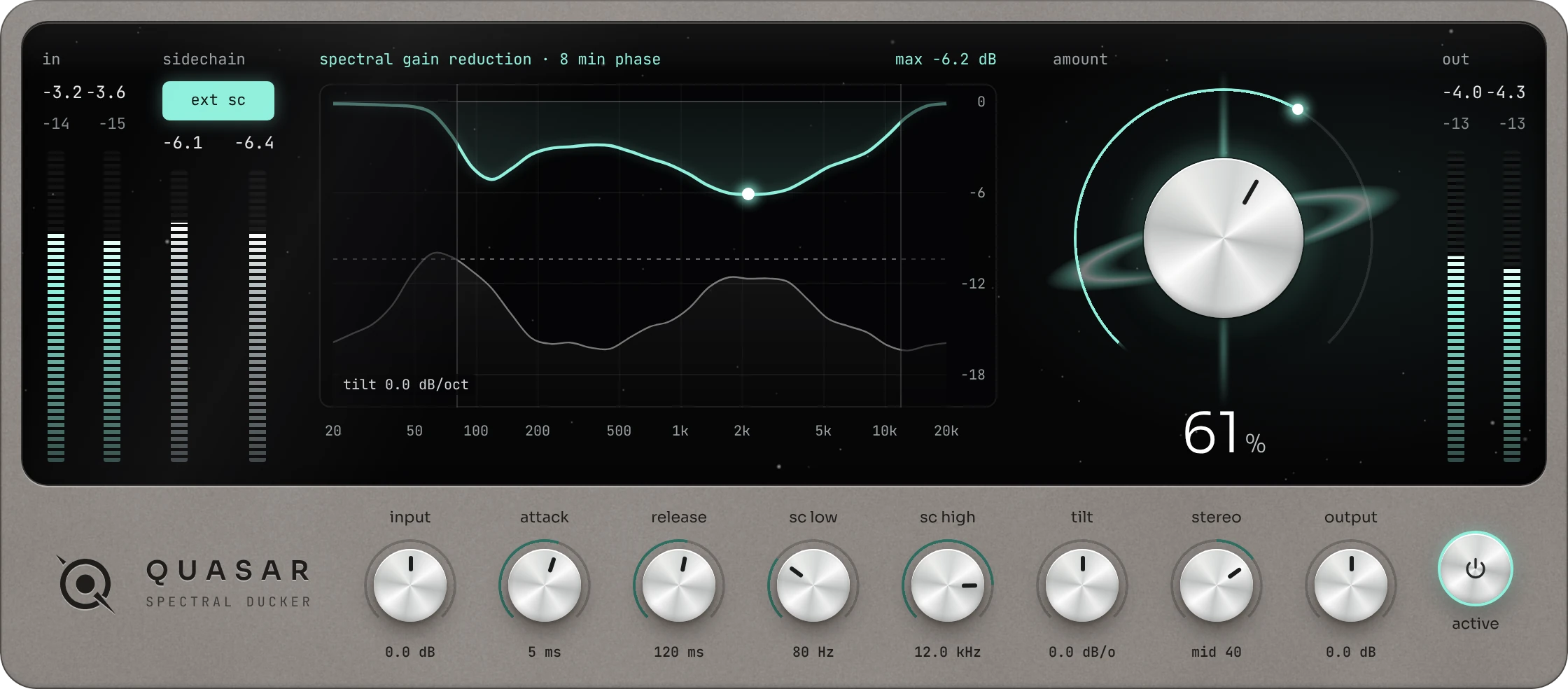
QSR-1 listens to your sidechain in 32 bands and turns down only the frequencies that collide. Spectral tilt decides whether the lows or the highs make room first, so the kick cuts through the bass and the vocal floats over the mix without the rest of the track pumping.
VST3 · Windows
How it works
Make room only where it’s crowded.
-
It listens.
Send QUASAR a kick, a vocal or any other track through its sidechain. It measures that signal in 32 bands, from 20 Hz to 20 kHz.
-
It finds the clashes.
Only the bands where the sidechain is loud get turned down. Everything else in the track keeps playing, untouched.
-
You tilt the result.
Spectral tilt leans the ducking toward the lows or the highs, up to ±6 dB per octave. One control, completely different results.
Videos
Watch QUASAR clear a mix.
Short videos that show what QUASAR does, how spectral tilt changes the sound, and how to set it up in your DAW.
Add a link for this video in the Customizer
Plays from when you press play.
1:30This video can’t be played in this browser. Please try another browser, or come back later.
QUASAR in 90 seconds
What spectral ducking is, why it beats ducking the whole track, and the three controls that matter most.
Features
Everything you need to untangle a crowded mix. Nothing you don’t.
-
32 BANDS
Spectral Ducking
Frequency-by-frequency ducking that follows your sidechain in real time, so only the parts that clash move.
-
±6 DB/OCT
Spectral Tilt
Lean the ducking toward the lows for kick and bass, or toward the highs to carve space for vocals and leads.
-
SIDECHAIN
Filters and external input
Low and high cut on the sidechain, plus an external input, so exactly the trigger you choose drives the ducking.
-
ATTACK · RELEASE
Shape the motion
From snappy and transparent to slow and breathing: set how fast QUASAR reacts and how it lets go.
-
MID · SIDE
Stereo focus
Aim the ducking at the centre of the mix or at the sides, and keep the rest of the stereo image intact.
-
ANALYSER
See every move
The display shows the sidechain, the ducking curve and its deepest point, so you always know what changed.
This thing is amazing!!!
This is what I needed to free up space in my songs.
THIS IS THE SAUCE.
Get QUASAR
One plugin. Room for every sound.
QUASAR
SPECTRAL DUCKER
one-time purchase
- VST3 for Windows
Secure checkout · [REFUND / TRIAL POLICY]
SPECS
- Bands
- 32 · 20 Hz – 20 kHz
- Spectral tilt
- ±6 dB/oct
- Sidechain
- external input · low + high cut
- Stereo
- mid / side focus
- Format
- VST3
- Systems
- Windows
- Window
- resizable 60 – 150 %
Questions
How is QUASAR different from a regular sidechain compressor?
A sidechain compressor turns the whole track down every time the trigger hits, so everything pumps. QUASAR splits the track into 32 bands and only turns down the bands where the sidechain is actually loud. The rest of the sound stays exactly where you put it.
What does spectral tilt do?
It decides where the ducking leans. Negative tilt pushes it toward the lows, which is what you want for kick against bass. Positive tilt pushes it toward the highs, which clears room for a vocal or a lead. At 0 every band is treated equally. The range is ±6 dB per octave.
Which DAWs and formats are supported?
QUASAR is a VST3 plugin for Windows.
Can I use an external sidechain?
Yes. Switch on “ext sc” and route any track into QUASAR’s sidechain input. The sidechain low and high cut let you focus on the part of the trigger that matters, for example only the kick’s low end.
Does QUASAR add latency?
It adds a minimal amount, which your DAW usually compensates for.
Can I resize the plugin window?
Yes. Drag the corner anywhere from 60 % to 150 %, or right-click the case for preset sizes. QUASAR remembers the size you pick.
Can I try it before I buy?
Yes, you can use an unactivated Demo version by downloading the Plugin here: PLATZHALTER